Introduction
Suriwire is a plugin for wireshark which display suricata alert and protocol info on a pcap file inside the wireshark output. Suriwire is using Suricata’s EVE JSON log file to generate information inside Wireshark and thus is requiring at least Suricata 2.0.
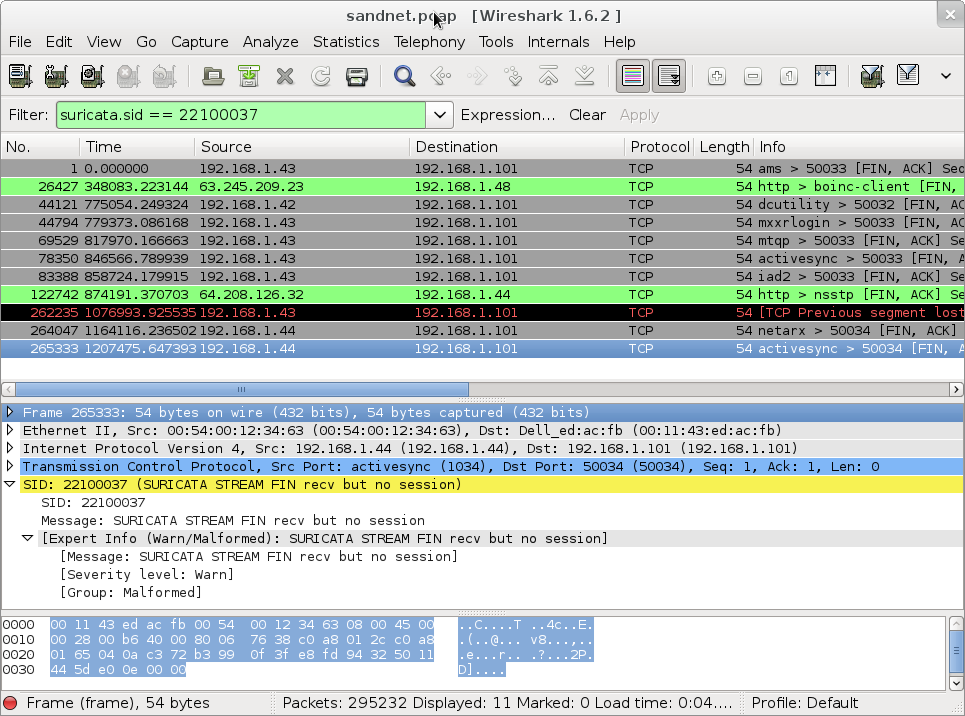
Suriwire has the following features:
- Display of alerts in the expert info window
- Display of alerts on a packet in the packet details
- Filter wireshark output by using signature fields such as a given sid or the content of a signature message
- Display of protocols information such as TLS and SSH in the expert info window and packet details
- Filter wireshark output using Suricata extracted protocol fields such as TLS subject DN
For example, you can filter on all TLS subject matching a string like ‘microsoft’ by using the filter suricata.tls.subject contains “microsoft”:

Download
Latest release is version 0.2: suriwire-0.2.tar.gz.
Suriwire is hosted on github: suriwire on github.
If you are using a pre 2.x Suricata, you can use the version 0.1 of suriwire that is using the pcapinfo log file: suriwire-0.1.tar.gz
Usage
Installation
To use suriwire, copy the suriwire.lua file in your ~/.wireshark/plugins/ directory.
Optionaly, once done, you can launch wireshark and set up the Suricata protocole (in Edit->Preferences->Protocoles->SURICATA). The only thing to do is to give the complete path to the events file.
This events file can be obtained by activating the EVE output when doing the parsing of the pcap file you want to study with Suricata.
Note: The EVE module is currently only available in version 2.0 of Suricata.
Using suriwire
After the opening of the pcap file in wireshark , go to Tools->Suricata->Activate:
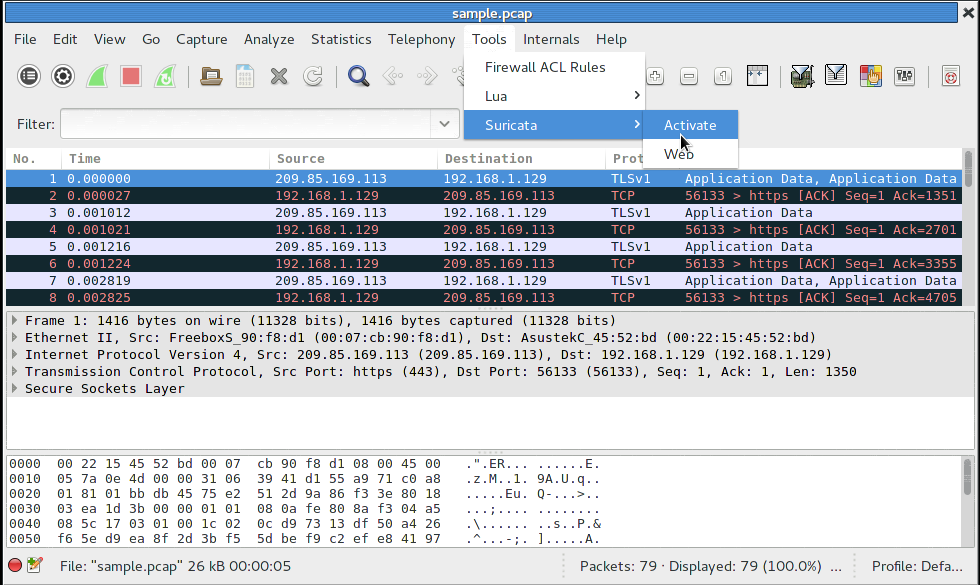
This will popup a dialog. If the events file name is correct, simply click OK. If not, enter the path of the events file.
You will now be able to see suricata alerts in the detail of the packets or to search for a given alert.
Search can be done on suricata.alert to display all the packets that have triggered an alert. If you want to search something more specific, you can use suricata.alert.msg and suricata.alert.sid. Depending of what output you have enable in EVE JSON output, you can also search on events fields like suricata.http.user_agent or suricata.tls.issuerdn.
Suriwire has been featured at LinuxLinks.com
Is there a possibility to view the raw PCAP information inside of kibana?
Hello. Suricata 2.1beta1 export packet and stream data inside the alert (in json format) so you see the content of that into kibana.
It’s remarkable designed for me to have a web site, which
is good designed for my knowledge. thanks admin
Suriwire appears to require the Lua CJSON module, but it’s not mentioned anywhere on this page, as far as I can tell. You should mention that it’s a requirement, and point people to its home page at https://www.kyne.com.au/%7Emark/software/lua-cjson.php, to make it less likely that people will have to ask about it on the Wireshark Q&A site (https://ask.wireshark.org/question/26616/seems-like-i-am-missing-cjson-files-for-suriwire/).
I tried to install Suriwire launching wireshark but it was not successful for me. I hired one of developers.
Thanks anyway!